Claude Code Task Manager: Scope, Checks and Packaging
Quick answer: Give Claude Code a small, verifiable task-manager brief, then check process names, units and packaging on the OS you actually use. The recording is a project walkthrough. It is not a complete installer test or a reproduced prompt.
A task manager is a useful coding-agent project because its output can be compared with the operating system. A polished CPU graph is not enough. The application must associate the right process, units and time period with each value.
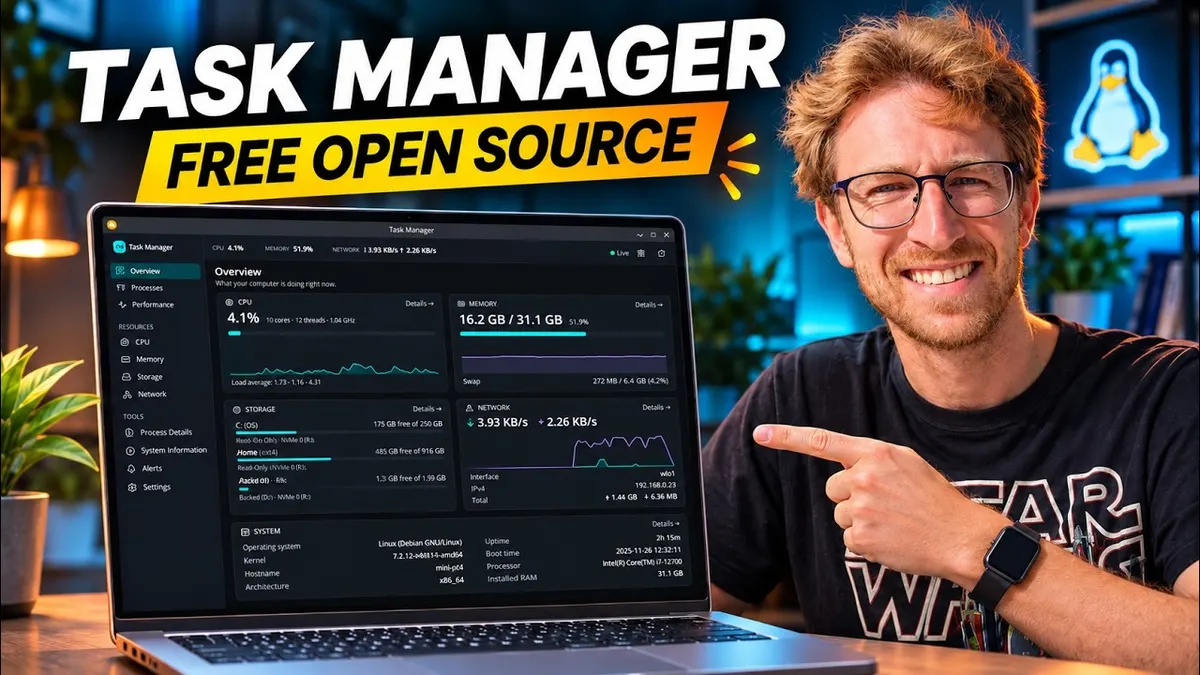
In the AAS recording, Mike shows a Linux and Windows task-manager project he says he built in about three hours. He then explains the prompting approach and asks for installable Linux packages. This is a project walkthrough and a way to structure your own brief, not a complete source-code build-along.
Start with a small, verifiable brief
Mike describes asking for a task manager that monitors processes, CPU and memory, then asking a chat model to turn that into a detailed implementation prompt. That longer prompt produced the initial application. The exact complete prompt is not spoken, so this guide does not pretend to reproduce it.
For your own brief, define the operating system, the values to display and a small acceptance check for each. For example, a process list should show a known application appearing when opened and disappearing when closed. That is editorial evaluation guidance, not a test run carried out for this article.
Keep platform differences explicit. The recording says a benchmark feature is available on Windows but not yet Linux. Do not ask an agent to conceal that difference behind an identical-looking interface.
Inspect the application by function
The recorded app has an overview, CPU and memory information, per-process details, performance history, and system information. Mike demonstrates expanding process details and pausing the history view. He says he compared the displayed values with another monitor.
Treat that comparison as his recorded account, not an independently reproduced validation. CPU percentages can differ when tools sample at different intervals. Memory labels can also refer to different measures. Record those definitions before deciding that two different numbers mean a bug.
Ask the coding agent to explain where each metric comes from. A task manager should not populate unavailable values with plausible-looking placeholders. Make an unavailable sensor visibly unavailable.
Separate development from packaging
Mike asks to build Debian and AppImage packages so the application can be installed instead of remaining a development server. The transcript does not provide a complete packaging command or confirm every resulting installer on a clean machine.
Use the current project repository for its actual build instructions. The repository describes a Tauri, Rust and React application for Windows and Linux. That description supports the project identity, not a claim that its present code passes every check.
For a release, review the generated package, permissions, launch behavior and uninstall path on the intended operating system. Keep packaging work separate from a request to change system services or startup entries.
Troubleshooting and boundaries
If a graph looks wrong, check units and refresh intervals before redesigning it. If one platform lacks a feature, document the gap rather than implying parity. If packaging fails, keep the exact error and environment in the next prompt instead of repeatedly asking the agent to “fix everything.”
The useful takeaway is a loop: define measurable behavior, generate a bounded first version, compare outputs and package only after review. The recording does not establish that every reader can finish in three hours, that paid model access is unnecessary or that the app is superior to all existing monitors.
Watch the walkthrough
FAQ
Is the complete build prompt included?
No. Its purpose and scope are described, but the complete source prompt is not spoken.
Does this replace learning how system metrics work?
No. You need enough understanding to tell a meaningful measurement from an attractive chart.
You may also like



Build the next one with AI Income Lab
Step-by-step courses, reusable templates, and a community that answers when you get stuck.
Members get the Claude Code & Skills and Codex Tutorials & Courses lessons.
- Courses for builds like this one
- Copy-ready templates
- Ask questions while you build
- Weekly coaching on VIP


