Aegis VPN with Claude Code: Build and Test the Client
Quick answer
Aegis VPN is Mike's WireGuard desktop client, built with Claude Code in Herdr on a Tauri and Rust stack. The first video covers the ChatGPT research, the plan, and an early Linux compile. The next-day follow-up shows a public GitHub repo, imported free Proton test server configs, and the leak, kill switch, and speed checks he ran. The app was Linux-only in that recording. Mike said it was not 100% secure yet. This is one combined guide because the two videos are the same project, not two separate VPN products.
On 16 November 2026 Mike recorded I Built My Own VPN Instead of Paying for One! (15:57). The next day he recorded I Built a VPN That Anyone Can Use for Free! (12:32). Both are published long-form videos on AI Automation Station. The official descriptions cross-link them as a build and a follow-up, and the second video's public repo is github.com/mikeholp87/aegis-vpn.
This page follows what he said in the auto-generated captions. Product names in those captions are sometimes misheard. Herder is treated as Herdr, Tarry as Tauri, Ages as Aegis, and Cloud Code as Claude Code. Prompts and commands are included only when the wording appears in the transcript. The long master prompt and the agent handoff prompt were shown on screen but not read aloud, so they are not reproduced here.
Ask ChatGPT for a plan
Mike started by asking ChatGPT how hard it would be to build a Windows and Linux VPN desktop app inside Codex, Claude Code, and Cursor. The research question he spoke was:
how difficult would it be to build something like this inside Codex, Claude Code, and Cursor.ChatGPT's reply, as he read it, was a two to four week estimate, plus a suggested stack: WireGuard for the VPN protocol and Rust for the application backend. He thought an initial MVP could take closer to 20 to 30 minutes, or a couple of hours. It also suggested a week-by-week plan: a foundation desktop app, then Linux networking with WireGuard using Network Manager on supported systems, then Windows integration. The name Aegis VPN came from that plan, not from him.
It produced a complete detailed prompt. He copied that long prompt, but he did not read it out, so the full prompt is not in this guide.
Open the project in Herdr
He pasted the prompt into Herdr, which he called his favorite desktop app for AI coding work. The Aegis VPN project was already open and Claude Code was in plan mode. First-week tasks he read from the plan included setting up a GitHub repo, a Tauri desktop shell, a Rust workspace, a design system, and shared VPN data structures.
When the plan came back, after about two minutes, he said Claude had written a plan and was ready to execute. He accepted the recommended options he mentioned: a real Linux tunnel test that needs root, with a suggested split of root plus a VM, an MIT or Apache 2 license, a local git directory, and a CI build-only setting for Windows. He was not yet sure whether the GitHub repo would be public.
If you use Herdr on Windows rather than on Linux, the Herdr on Windows guide covers install and layout. The Herdr terminal guide covers workspaces and sessions.
Install Wireshark with UpdateForge
While the plan was running, he opened UpdateForge, his open-source package update manager for Linux and Windows. Wireshark appeared under recommended packages. He clicked Install, entered his password, and waited for the download. Then he opened a terminal and typed:
WiresharkHe said he was not sure how to use Wireshark himself, and that the coding agent would use it. There is no UpdateForge guide in the verified map, so this page does not link one. He later said Claude Code was reading Wireshark and Network Manager documentation.
Build in auto mode
To start the build he said:
yes, go ahead and proceed and use auto modeHe described the stack as Tauri for the application front end and Rust for the back end. A Cargo file appeared as files were generated. He said he did not write a single line of code. Claude Code was on Opus 5.5 for this run. He said he typically uses Sonnet, and that Fable 5.2 would be even faster but too expensive because it blows through credits.
He also mentioned later advanced ideas, such as adding name servers and managing WireGuard keys and VPS instances, but said he wanted to focus first on the core VPN and advanced controls. The first milestone he read from the plan was to get Aegis VPN running on the Linux computer with a real WireGuard connection.
Costs he discussed
These figures are what he said in the 16 November recording, including a note that the hosting numbers were planning estimates, not current hosting quotations. Bandwidth, region, and provider policies would affect costs. They are not a price list for Aegis VPN, and they have not been rechecked against vendor pages for this draft.
While looking at Proton VPN, which he said he typically uses, he described a free plan, a monthly price he read as about $9 to $10, and a yearly plan he read as $3 per month. In the follow-up he again read Proton as about $10 per month. For his own operating-cost sketch he said development tools were basically $0 excluding optional paid coding plans, then $20 a month for Claude Code and $20 a month for Codex, $0 for a public GitHub repository, about $5 to $10 a month for one small VPS, with Hostinger mentioned at $7 a month and about $10 a month for the most popular plan, or $15 to $30 a month for three VPS locations. He summed that as maybe $20 to $30 a month to run the whole thing, or even running it on his own computer if he had a server.
In the first video he also talked about undercutting other VPNs on price. By the follow-up he said the app was currently free and open source, and that he was using it as a hobby project, mostly for personal use.
Handoff to Codex and Cursor
ChatGPT also provided a short follow-up prompt for handing work from Claude Code to Codex or Cursor. He opened Cursor, Claude Code, and Codex as separate tabs in Herdr and said he could paste that prompt if he ran out of Claude Code credits. He did not read the handoff prompt aloud, so it is not included here. For how he thinks about those two agents more generally, see the Claude Code and Codex guide and Codex on Linux.
The written recommendation he read was Codex for primary implementation, Claude Code for architecture and security review, and Cursor for interface refinements and manual debugging. He said that was only a recommendation, and that he typically prefers to build first in Claude Code, then hand work to Codex. He was still on the $20 per month Claude plan and had not decided to move to the $100 a month plan.
First compile
After about another 10 minutes he said the front end build was done and the Tauri desktop app was compiling in Rust. He opened his own task manager to show the CPU maxed out, then dropping as the compile finished. In total he said the MVP had taken about 20 to 25 minutes, and later that something like this could be up and running in 15 to 20 minutes on Opus 5.5.
The first launch was not a live tunnel. He said the app would add tray settings, a navigation listener, and then launch with a mock backend so he could look at it. What he showed was an early Aegis VPN window: a color-scheme control, an About section, and a way to add a WireGuard profile. He called it a very early version and a work in progress, and said he would keep building it.
The task manager he used on screen is the same project covered in the Claude Code task manager guide. In the follow-up he called that app Tasky.
Import free server configs
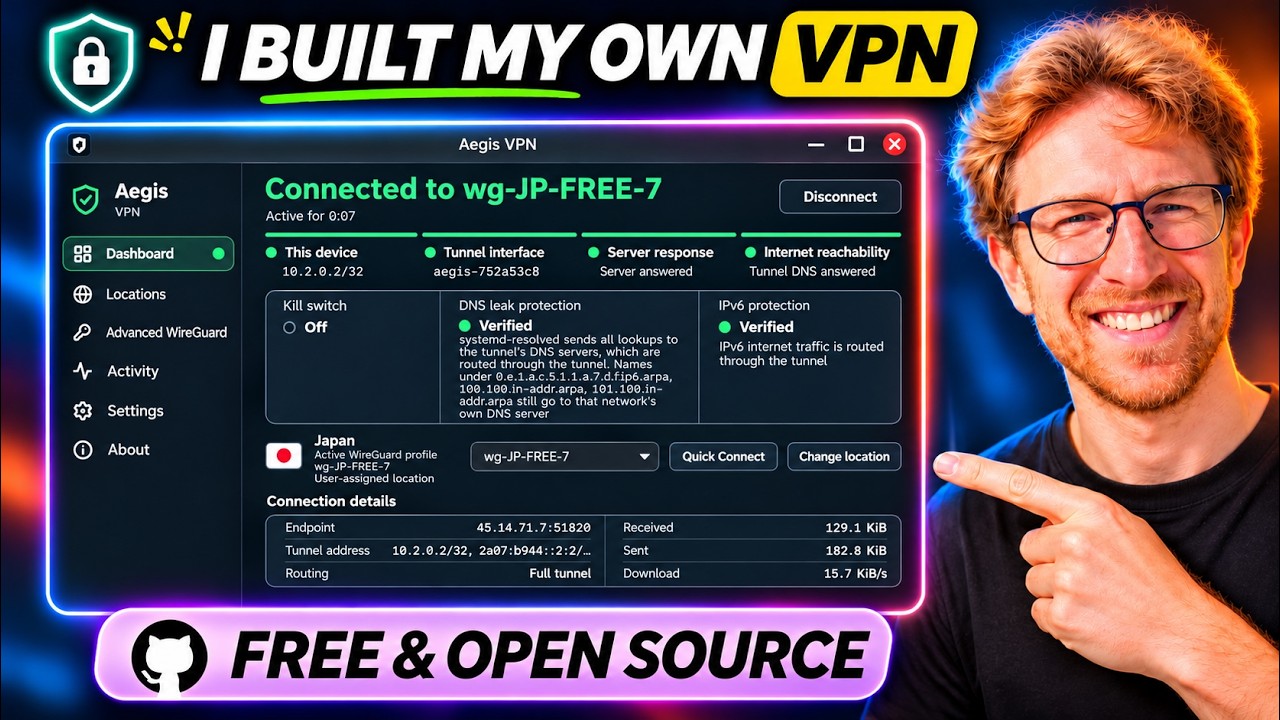
The 17 November follow-up starts with Aegis VPN running on his computer. He said he had made it a public GitHub repo, with the link in the video description, and that anyone could clone it and play around with it. He also said it was not 100% secure yet. The servers he was using were free Proton VPN test servers: config files you download and import into the app in order to connect.
In Locations he already had test servers in the US, Switzerland, Japan, and Canada. He switched to Canada and later to a Swiss server. The Canada connection looked to him like it still had issues with internet reachability. IPv6 protection and DNS leak protection were both marked verified in the app. He also pointed at traffic stats, download and upload, and sent and received packets. Under Wi-Fi he said it was using a full tunnel through his local network.
Because those servers were Proton's free endpoints, he said he was not really saving anything, and that he could just use Proton VPN itself. He described the setup as temporary until he created his own VPS, probably with something like Hostinger, in another country. He was still not 100% sure how that would work.
Checks from the follow-up
He compared the IP shown in the app with a what-is-my-IP website. The app showed 185.98.171.117. The website showed 185.98.171.163. He said those were not quite the same, and that they normally matched.
ChatGPT's recommended tests, as he read them, started with DNS and IPv6 leaks, which he believed were already working because the app said verified. On Linux he said you can use systemd-resolved, and he found that service running in his task manager, including a PID and a runtime of about 18 hours. He did not speak a terminal command for that check, so none is included here.
The next recommended test was a kill switch failure: in an isolated test environment, interrupt the WireGuard tunnel while protecting mode is active, and verify that ordinary internet traffic is blocked rather than re-routed through the original connection. In the app the kill switch was off, and under Activity it said the kill switch was currently off or not connected. He said he was not exactly sure how to turn it on, and that he was still building that in. He did not call it mission critical.
He then ran a speed test. He said his normal download speeds were around 500 to 600 megabits per second, and the VPN result was about 430 megabits per second. That is one run on his connection, not a benchmark.
While this was going on, coding work continued in the background, including what he read as sleep resume handling and network switching. He said he had started the project only the day before, that he was at 62% of his Claude week with a reset in about 4 days, and that he had moved off Opus 5.5 to save credits. The caption says "Sonic" at that point, which is likely Sonnet.
For a later Windows port, he suggested this ChatGPT ask, which he had not yet run in that video:
can you come up with the detailed prompt to port this over to Windows?Done when
- You asked ChatGPT for a stack and a prompt
- You ran Claude Code in Herdr auto mode
- You imported Proton configs and checked leaks
Watch the walkthrough
The primary video is the 16 November build. The follow-up is the 17 November test of the public Linux app. Both use the official YouTube thumbnail as the player facade.

- 0:00 Building a Custom AI VPN Intro
- 0:52 WireGuard, Rust & Tauri Tech Stack
- 2:20 Aegis VPN Master Prompt & Plan
- 2:55 Setting Up Claude Code in Herdr
- 4:01 Installing Wireshark via UpdateForge
- 4:49 Generating VPN Codebase in Auto Mode
- 7:52 Proton VPN vs Self-Hosted VPS Costs
- 8:37 Multi-Agent Handoff (Claude, Codex, Cursor)
- 12:14 Compiling & Testing Aegis VPN App
- 14:54 AI Income Lab & Open-Source Outro
- 0:00 Building My Opensource VPN
- 0:43 Importing Free Server Configs
- 1:50 Verifying IP & DNS Leak Protection
- 3:52 Free Proton Servers vs. Self-Hosted VPS
- 4:24 AI Coding with ChatGPT, Claude Code & Cursor
- 5:56 Kill Switch & Security Diagnostics
- 6:33 VPN Speed Test Results
- 6:55 Why Build a Free VPN Alternative?
- 11:40 Join AI Income Lab & Open-Source Projects
FAQ
Is Aegis VPN free and open source?
In the 17 November 2026 follow-up, Mike said the app was currently free and open source on a public GitHub repo, under the Apache 2.0 license and the MIT license. He also said it was currently only available for Linux, with a Windows port still to come. The official video description lists the repo as https://github.com/mikeholp87/aegis-vpn. He asked people not to use it for nefarious activities.
Can I copy the master prompt or the agent handoff prompt from this guide?
No. In the first video Mike copied a long detailed prompt from ChatGPT into Herdr and later pointed at a short follow-up handoff prompt for Codex or Cursor, but he did not read either prompt aloud. This guide does not reconstruct text that is not in the transcript. The research question he did speak is included in the steps above.
Is Aegis VPN ready to replace a paid VPN?
Mike said in the follow-up that it is not 100% secure yet. He was using free Proton VPN test servers, the in-app kill switch was off, and he was still working out how to turn it on. In the same recording, the IP shown in the app and the IP on a what is my IP site did not match. Treat the project as an in-progress hobby build, not as a finished security product.
Does Aegis VPN run on Windows?
Not in the follow-up recording. Mike said it was currently only available for Linux and that porting it to Windows would be the next task. The first video planned Windows integration after the Linux build, including a CI build-only option for Windows.
What speed did the VPN get in the video?
In one test in the follow-up, Mike said his normal download speed was around 500 to 600 megabits per second, and the VPN test showed about 430 megabits per second. That is a single run on his connection, not a benchmark.
Which coding tools did he use?
He asked ChatGPT to research the idea and to write prompts, then ran Claude Code in Herdr, first in plan mode and then in auto mode. He also opened Cursor and Codex tabs in Herdr for a possible handoff. For the first compile he said he was on Opus 5.5. In the follow-up he said he had been using Opus 5.5 and had switched to save credits, with the week usage at 62 percent and a reset in about 4 days. He also mentioned a $20 per month Claude plan.
Sources
This page is based on public auto-generated English captions for both videos, retrieved 19 November 2026, 18:02 ICT with youtube-transcript-api 1.2.4, plus official YouTube titles, durations, chapter lists, and descriptions. The captions are machine-generated and were not checked line by line against the picture. No frame screenshots are used. Player images are the official YouTube maxresdefault thumbnails.
- Build video: I Built My Own VPN Instead of Paying for One!, published 16 November 2026, 13:37:07 ICT
- Follow-up video: I Built a VPN That Anyone Can Use for Free!, published 17 November 2026, 10:46:47 ICT
- Public repo listed in both official descriptions: github.com/mikeholp87/aegis-vpn (HTTP 200 on 19 November 2026)
Proton and Hostinger prices, and the VPS cost ranges, are what Mike said in the recordings, including his own note that hosting figures were planning estimates. They have not been rechecked against current vendor pages. In the first video outro he also said that some tool links on the site are affiliate links, and that a signup can pay him a commission. These two videos did not carry a YouTube paid-promotion overlay in the earlier metadata check of the assigned IDs, and the official descriptions for these VPN videos do not present a paid sponsor read.
You may also like

Build the next one with AI Income Lab
Step-by-step courses, reusable templates, and a community that answers when you get stuck.
Members get the Claude Code & Skills and Codex Tutorials & Courses lessons.
- Courses for builds like this one
- Copy-ready templates
- Ask questions while you build
- Weekly coaching on VIP


