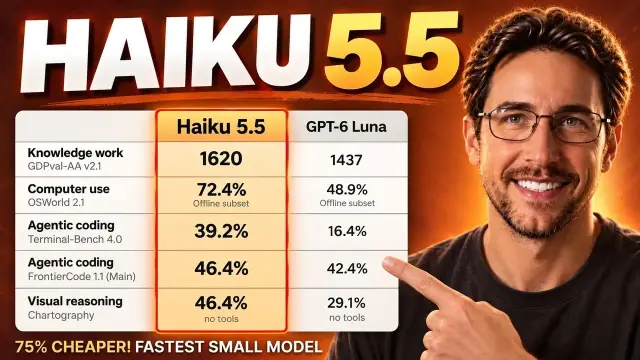
Claude Sonnet 5.5: benchmarks and a speed test vs Sonnet 5
Watch on YouTube ↗ Subscribe on YouTube ↗
A walkthrough of Anthropic's Claude Sonnet 5.5, announced as over 30 percent faster than Sonnet 5 and up to 30 percent cheaper for most work at the same $2 and $10 per million token price. Mike reads Anthropic's benchmark charts, runs a side-by-side HTML game speed test against Sonnet 5, and recommends high effort for coding. The benchmark claims come from Anthropic's announcement.
Video summary
Claude Sonnet 5.5 release: up to 30% cheaper, vs Opus 5.5 benchmarks, pricing, Frontier Code tests, image/chart understanding, HTML speed test, effort levels, cybersecurity safeguards.
Claude Sonnet 5.5 is now faster and cheaper — Anthropic mid-tier upgrade for everyday coding.
The video covers 10 parts: Intro to Claude Sonnet 5.5 Release: Overview of Anthropic's new AI model, Claude Sonnet 5.5 vs Claude Opus 5.5 Benchmarks, Claude Sonnet 5.5 Pricing Breakdown, Maximizing Coding Performance, Frontier Code Benchmark Tests, Image Understanding & Chart Recognition, HTML Coding Speed Test: Live side-by-side speed test on Claude Sonnet 5.5, Optimizing Claude Effort Levels, New Cybersecurity Safeguards, and Introduction to the AI Income Lab community.
What this video covers
What you build
Nothing is built beyond a short speed test of a sand dune game and a starling flock page generated by Sonnet 5.5 and Sonnet 5 side by side.
Tools used
Key steps
- 0:24 - Compare Sonnet 5.5 and Opus 5.5 benchmarks from Anthropic's post.
- 1:18 - Read the pricing: $2 and $10 per million tokens for Sonnet 5.5, against $4 and $20 for Opus 5.5.
- 2:20 - Look at coding scores by effort level and why high effort is worth using.
- 4:25 - See image understanding and chart recognition gains.
- 5:21 - Watch a speed test creating HTML games with Sonnet 5.5 and Sonnet 5, where 5.5 uses about 13,000 tokens against 21,000.
- 6:20 - Learn that Claude Code defaults to medium effort and the platform to high.
- 6:50 - Read how higher-risk cyber security tasks fall back to Sonnet 5.
Not covered
- Independent benchmarks. The charts and percentages come from Anthropic.
- A quality comparison of the two models' games beyond speed and token use.
- Real project results from Mike, who is only starting to use the model.
- How often the cyber safeguards trigger a fallback during normal coding.
In this video
- 0:00 Intro to Claude Sonnet 5.5 Release: Overview of Anthropic's new AI model
- 0:24 Claude Sonnet 5.5 vs Claude Opus 5.5 Benchmarks
- 1:18 Claude Sonnet 5.5 Pricing Breakdown
- 2:20 Maximizing Coding Performance
- 3:01 Frontier Code Benchmark Tests
- 4:25 Image Understanding & Chart Recognition
- 5:21 HTML Coding Speed Test: Live side-by-side speed test on Claude Sonnet 5.5
- 6:20 Optimizing Claude Effort Levels
- 6:50 New Cybersecurity Safeguards
- 7:30 Introduction to the AI Income Lab community
Questions and answers
What does Sonnet 5.5 cost?
$2 per million input tokens and $10 per million output tokens, the same as Sonnet 5, with cache reads at 20 cents.
What did the speed test show?
Sonnet 5.5 finished a game faster and used about 13,000 tokens against 21,000 for Sonnet 5, in one run.
Which effort level is suggested?
High for coding, instead of the medium default in Claude Code.
Keep learning
Transcript
Good news, we have another new AI model released. This one coming from Anthropic. I've got the official tweet pulled up here introducing Claude Sonnet 5.5, the second model in the Clawude 5.5 family. And this one's a clear upgrade over Sonnet 5, which runs more than 30% faster and costs up to 30% less for most work. Opus 5.5 is still beating Sonnet 5.5 pretty much across the board except for Terminal Bench 4.0 for Agentic Coding.
Sonnet 5.5 is scoring 70.6 which is a massive increase compared to the only 10.3% on set 5 and it's just narrowly edging out Opus 5.5. Major gains across coding, knowledge work, image understanding, and long horizon tasks. And in terms of cost, it's the same token price as Sonnet 5, but typically uses fewer tokens per task. I'm using the Claw desktop app. And as you can see, I can easily switch the model, the effort mode, and get started right away.
Read the rest of the transcript
And I'm already noticing over here that it is very, very fast, especially on high effort mode. You cranking through these tasks very, very quickly. Can also take a look at the pricing. So for input tokens, it's only $2 per million input tokens versus $4 per million input tokens for Claude Opus 5.5 and $10 per million input tokens for Sonnet 5.5 versus $20 for Opus 5.5. So it is faster, more efficient, and less token hungry.
In terms of performance, Sonnet 5.5 scores 70.6% 6% uh scores two points below opus 5.5 on GDP vow and it's strong on long horizon work and image understanding says for collaboration like opus 5.5 Sonnet 5.5 writes more clearly than other previous generation of models priced the same as sonnet 5 at $2 per million input tokens and $10 per million output tokens and it's only 20 cents per million tokens for cash reads but it typically needs far fewer tokens to do the same work In terms of
speed, Sonnet 5.5 generates output 30% faster than Sonnet 5. Also go through some of the performance benchmarks which we already looked at. Uh we could look at Terminal Bench 4.0. So for Sonnet 5.5 on max mode, it's coming in at around $12.54 uh cost per attempt, edging out Opus 5.5 by about 6 percentage points. And it's a little bit more expensive, but not significantly.
I typically use medium mode, but I can see now that I'm going to have to bump that up to either high, extra high, or max mode in order to get the best bang for my buck because a lot of the things that I'm doing inside Claude Code, as you can see over here, I'm mostly using it for the coding tasks and it's scoring much higher on high mode and extra high and max mode versus medium and low. So, this is something good to know.
We've also got the Frontier Code benchmark test over here as well. Opus 5.5 is still coming out on top for this one. And interestingly, Sonnet 5.5 is about three times as expensive as Opus 5.5 on Frontier Code benchmark. But for extra high mode, they're pretty much neck and neck. Opus 5.5, Sonic 5.5 scoring a little bit higher, and it's also slightly cheaper. So, I would recommend, you know, using extra high or high mode if you're doing a lot of coding.
And then for a gent coding cursor bench over here, uh, Opus 5.5 and Sonnet 5.5 are roughly neck and neck. There's not any significant performance gains on cursor bench. And for knowledge work, once again, Opus 5.5 and Sonnet 5.5 are roughly tied on this benchmark as well. High effort on Frontier Code, it scores 10 points higher than Sonnet 5 at the same setting at about 1/5if of the cost per test. So that's pretty significant.
And on cursor bench, which tests models on task from real cursor coding sessions, its best score is within about two points of opus 5.5. It's slightly cheaper. So it's about, you know, $4 cheaper on max mode in cursor bench. It's close to opus 5.5 in computer use and chart recognition and clearly outperforms Sonnet 5 and GDP6 soul. It's looking at it's only a 1% difference in performance versus Opus 5.5 and significant gains almost 30 percentage points higher versus Sonic 5. And same for chartgraphy as well.
It's scoring nearly 50 points higher. Cost and speed, which is what most people really care about. Uh its input tokens are at only $2 per million input tokens versus $4 per million input tokens for Opus 5.5. So, it's half the cost on both input and output tokens. $10 per million output tokens for Sonnet 5.5 and $20 per million output tokens for Opus 5.5. So, if you're looking to get things done cheaper and I would say even faster, I'd recommend just using Sonnet 5.5.
Uh, we can also take a look at some of the tests down here as well. So this is basically a speed test creating a Sand Dune game in an HTML file. You can see the writing speed in terms of tokens. It's roughly the same I would say versus Sonnet 5. But I would say that this is quite a bit faster. And now we've already got the finished game while Sonnet 5 is still working furiously over here. This one's been running for about 11 seconds.
This one's been running for roughly 4 seconds. So, the speed differences are not all that significant, but it does show that Sonnet 5.5 is a clear winner. You can see Sonnet 5 over here has used a whopping 21,000 tokens versus only 13,000 for Sonnet 5.5. And this one is much, much further along versus Sonnet 5. And it's already done. Got another one over here creating a murmmoration of 400 starings in one HTML file. So you can see Sonnet 5.5 gets started much sooner versus Sonnet 5.
Also goes on to say that adjusting the effort level lets you balance cost and speed against overall quality. In Claude Code and our apps, the default effort is set to medium while the Claude platform defaults to high. So like I said earlier, if you do want to get things done quickly in Sonnet 5.5, then I would recommend setting the effort level to high versus medium mode. So over here, I'm just going to bump this up to high mode as well, and we're off to the races.
It also has the safeguards built in for cyber security. It says, "Sonnet 5.5 cyber capabilities are large improvement over Sonnet 5. Users can still find and fix bugs in their code as part of a routine software development, but higher risk cyber security tasks will visibly fall back to Sonnet 5. So they do have a lot of those safeguards built in. If you're doing anything really significant with cyber security, you're automatically going to get bumped down to Sonnet 5.
If you're using 5.5, it says, "Use Sonnet 5.5 for well scope bug fixes, frequent coding turns, first drafts, but documented slide creation, and high volume workflows." Thank you so much for watching this video on Claude Sonnet 5.5. I hope you found it helpful and useful. You also have the option to join my Skool community called AI Income Lab where you will learn how to build your first useful AI workflow in 30 days. Prices start at $29 per month.
You can read all of the details over here on my landing page. And with that being said, thanks so much for watching. Take care. Stay safe. Peace from Thailand. Signing off.