Cortex AI second brain update: chat library and Ask Cortex
Watch on YouTube ↗ Subscribe on YouTube ↗
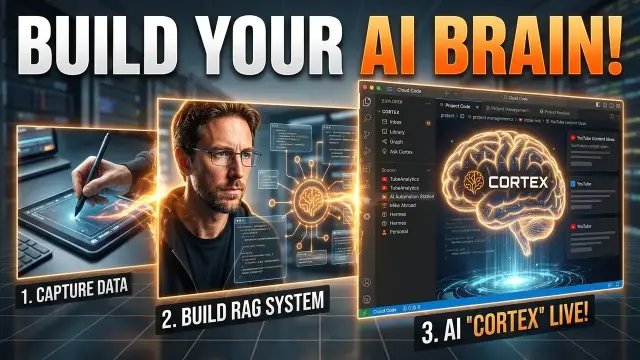
An update on Cortex, Mike's business second brain built with Claude Code and Codex. It now maps 27 projects with Graphify, imports Claude chat history into a retrieval library, answers questions through a Claude managed agent, stores contacts and campaigns, and has a content kanban and radar. The title's $25,000 figure is Mike's idea of what it could be sold for to clients, not a measured value. The Tube Analytics connector is planned.
Video summary
AI second brain built with Claude Code — enterprise-style knowledge system walkthrough.
The video covers 10 parts: Introduction & System Overview, Project Map & File Structures, RAG System & Chat Histories, Ask Cortex & Managed Agents, Spaces & Video Transcripts, Email Campaigns & Verification, Content Studio & Build Radar, Historical Chat Logs & Search, TubeAnalytics MCP Connection, and Implementation & Data Flow Strategy.
What this video covers
What you build
A local knowledge system with a project map, a library of imported chats and transcripts, an Ask Cortex page backed by a Claude managed agent, contact and campaign tabs, a content studio board and a signals radar.
Tools used
Key steps
- 1:00 - Look at the project map of 27 projects built with Graphify.
- 2:00 - Browse the library of imported Claude chats and video transcripts behind the retrieval system.
- 3:00 - Ask a question through the Ask Cortex page, which starts a read-only managed agent on Sonnet 5.
- 4:00 - Open spaces for each project with its inbox, transcripts and skills.
- 5:00 - Review contacts and email campaigns, where Mailgun email verification needs a paid account.
- 6:00 - See the content studio kanban and the build and content radar.
- 7:00 - Search the full chat history for a topic.
- 8:00 - Plan an MCP connector from Mike's analytics app into Cortex.
Not covered
- Any customer or sale. The $25,000 to $35,000 figures are what Mike says he could charge.
- The accuracy of the radar's recommendations, which Mike has not yet tested.
- Privacy of importing full chat histories and contact lists into a new system.
- The finished analytics connector, which is still being planned.
In this video
- 0:00 Introduction & System Overview
- 1:00 Project Map & File Structures
- 2:00 RAG System & Chat Histories
- 3:00 Ask Cortex & Managed Agents
- 4:00 Spaces & Video Transcripts
- 5:00 Email Campaigns & Verification
- 6:00 Content Studio & Build Radar
- 7:00 Historical Chat Logs & Search
- 8:00 TubeAnalytics MCP Connection
- 9:00 Implementation & Data Flow Strategy
Questions and answers
What does Ask Cortex use?
A read-only Claude managed agent on Sonnet 5, working over the imported chats, transcripts and project notes.
Is the project map useful?
Mike calls it pretty but not particularly useful.
Why can't it verify emails yet?
Mailgun's email verification is only available on paid accounts, and Mike is still on the free plan.
Keep learning
Transcript
Hey there, welcome to the channel. In this video, I'm going to be taking you through my AI second brain, which is called Cortex, which I'm continuing to build out inside Claude Code and Codex. It's getting more and more powerful by the hour. I've added a bunch of new features since my previous video yesterday, and essentially what I'm doing is I'm turning this into a $25,000 plus system, which I can potentially white label to clients. So, enjoy the video.
Please subscribe to the channel if you haven't already and let's get into it. So, first of all, I've got my project map over here. These are all of the different 27 projects that I've currently built as well as the inter relations between them. And this is just coming from Graphify to build this out. It's a free GitHub repository which you can easily grab. And from here, we can view the dossier on any of these projects with the overview, the decisions, the radar.
Read the rest of the transcript
So that's basically what I would build build next. I've created all of the MD files for each one of my projects with the text stack, the current state and features as well as the file structure and a bunch of other stuff. I can move these nodes around. I can zoom in, I can zoom out. So that's a pretty nice feature to have, but it's not particularly useful. It is pretty, but it's not useful.
This is my mission control center where I've got my inbox, my library to browse all of the knowledge as well as the top three things on my radar this week. So, this is coming from my RAD based knowledge system which I've built using Claude code and codecs. I've also imported my entire Claude chat history. Eventually, I'm going to import ChatGPT as well. I'm still waiting on the file to be sent over and this is training it on all of my knowledge.
So, if I come into library here, you can see it's pulled in my entire chat history from Claude in this case, and I've got all of the transcripts as well. And then I've built a rag system around that. So, for example, this one, this is directly from Claude. We can see the messages that I was sending to Claude. And all of that data is available over here. And now, if I want to actually ask the system, I could come over here.
We've got Ask Cortex, and I can choose which chat I want to talk to. So in this case I'm going to choose Claude. And now we've got all of the different collections over here inside Claude. So I've got a managed agent which I've set up which I'm calling the Cortex operator. And essentially what this is is just for asking Claude. So it says you are a Cortex operator readonly assistant for a private multibrand business knowledge system.
And now when I ask Cortex it's just going to spawn a managed agent over here. In this case, we're using Sonnet 5 to do a lot of this stuff. So, I can just come over here and say, "Tell me more about Tube Analytics." And it already has all of the data that I've ever asked Claude, as well as a lot of my project files. So, there we go. It's running Cortex Ask. And now it's generating the answer. Looks like it's already got an answer.
We've now got the full answer. And I can also come back in here and it's already saved that here as well. Eventually I will add a list of all the history of things that I've asked it. So that's really really nice to have. If I have any questions based on my knowledge base, I can just come over here and ask them and I will get an instant answer from the claude managed agent. under spaces.
I've got all of my main projects that I'm currently building, including Tube Analytics, AI Automation Station, which is my YouTube channel where you're watching this now, as well as some of the other online businesses that I'm building. I've got AI Income Lab, which is my Skool community, and some of the other projects. So, if I go ahead and click on AI Automation Station, I can pull that up, and you can see here's the inbox, and it's pulled up the full transcript, which I've also supplied.
I've got all of the transcripts for each one of my YouTube videos. This was just a simple Python script that I was able to whip up quickly inside Claude Code. So now that's part of my knowledge base as well. So we can see here's the full transcript for one of the YouTube videos that I've created and it's pulling all of this into my rag system as well.
And we've also got a lot of my custom skills that I've built in for Codex and claude code over here as well. These are skills that I've built. And it also suggests new skills that I might want to build based on what I've already created. And this should run in the background. I'm going to come over to contacts. Here's all of the emails from my Skool community. I've added all of these into my Cortex as well.
And I've also created a campaigns tab where I can send the email campaigns directly from within Cortex. And I've also built in a way to verify all the emails using Mail Gun as well. So if I click on verify all emails, it's actually going to say not available because it's only available for paid accounts. I'm currently still on the free plan, but eventually I'll be able to run that and then I can make sure that all these emails are actually valid so that I'm not getting
high bounce rates when I actually send the emails. Another feature that I'm currently building out is the studio. And this is using a canban form for actually generating the ideas, the scripting, assets, editing, and I can basically just drag and drop over here to show which phase it's currently in. And eventually, one of the stretch goals for this is I want it to just automatically generate all of the YouTube ideas from Tube Analytics, which I'm currently in the process of connecting up over here.
This is my powerful software as a service. It is the most powerful YouTube analytics platform out there and it also has an MCP built directly into it. So, what I want to do now is connect it directly up to Cortex. We're currently using GPT 5.6 soil, which is the most powerful model uh in Codex. The signals tab is basically what to build and shoot next. So, it's got the build radar and then also the content radar.
and it's suggesting new projects that I may want to build based on its entire knowledge base of all my projects. And I've also got the content radar, which is specifically for my YouTube channel. And you can see it's suggesting different YouTube videos that I may want to build. It's giving it a score. It's also outlining the video. And eventually I want this to actually go ahead and create the script as well, which potentially I could just feed into HeyGen, and it will read the entire transcript
for me. Again, this is something that I could potentially sell to clients for 10, 25, $35,000 for their own business. And I have history as well. So from here, I can easily search all of my conversations from Claude and ChatGPT. So, if I just go ahead and search for YouTube, for example, it's going to pull in that rag knowledge base, and we can see here's all of the instances where I was asking about YouTube in Claude.
So, I could click on this one, for example, writing business letters for general audiences. And now we've got the entire transcript over here of my conversation with Claude on that topic, which saves me from going over to Claude and searching through my entire chat history over here, which is just very, very, very time consuming. And now I've got all of that data directly inside my Cortex.
I think it's already built most of this inside Claude Code, but I've currently run out of credits until another like 2 hours or so. So, I'm going to have to wait for that to continue building out that feature. But basically, I just switch between Claude Code, Codex, and OpenCode to do all of this stuff. It's recommending to continue building out this Tube Analytics feature.
And this is basically just going to connect up my MCP in Tube Analytics directly to Cortex so that I can get access to all of my YouTube analytics data. And if you don't know already, this is Tube Analytics, the most powerful YouTube Analytics platform. got the MCP built directly in over here from Cortex and I could pull in all of the data from my existing software as a service using the MCP. So that's what it's continuing to build out over here.
It's going to add the dedicated tube analytics MCP connector and it's also going to pass in my API key which I've now supplied it with. It's just asking does this architecture and data flow look right? I'll say yes. And now it should just be able to connect up my existing YouTube analytics platform directly to Cortex and it's going to build out an analytics feature up here so I can get access to all that data.
And then ultimately what I want to do with this is for it to automatically suggest videos that I should create based on all of the data that it gets from YouTube analytics such as which videos are performing best, which videos are maybe not doing so well, how to optimize my titles, my thumbnails, all of that sort of stuff. And this is just going to create the complete detailed implementation plan using the superpowers skill which is built directly into Codex.
We've got the complete detailed implementation plan for connecting Cortex directly to the tube analytics remote MCP endpoint. It's going to import all the analytics currently exposed by the MCP. Store the data in a structured historical model for reliable dashboards while publishing grounded summary items for Cortex search, ask Radar, and Project Dossier. So, it's basically just going to pull in all of my data from tube analytics.
It should be able to create a rag system around it as well and it'll just build out this entire thing over here. So all I have to do is take this superpowers doc which is generated. I could just say go ahead and implement this which is going to make this thing even more powerful moving forward. So if you're interested in building something like this for your own business, go ahead, drop a comment down below. I'd be happy to help you.
And you can also check out my website, Automogic, where you can book a free consultation call with me to discuss building out a project to save you time and money for your business. With that being said, thank you so much for watching this video. Please go ahead and subscribe to the channel if you haven't already. Take care. Stay safe. Peace from Thailand. We'll see you in the next one. Sign it off.