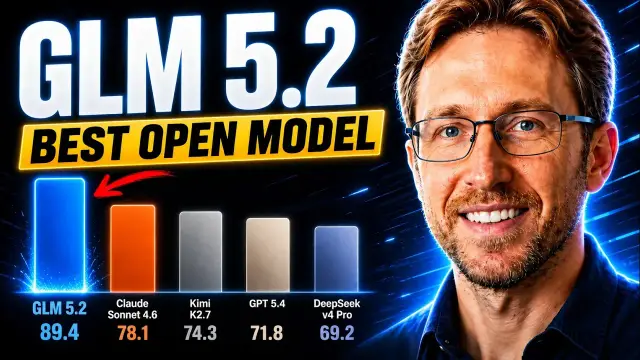
GLM 5.2 in OpenCode Go: setup and Hermes Agent test
Watch on YouTube ↗ Subscribe on YouTube ↗
Written guide: OpenCode Go: pricing, models, limits and setup
Select GLM 5.2 inside OpenCode on the Go plan, then use the same model in the OpenCode desktop app and in Hermes Agent. The free Zen option returned an insufficient balance error, so the test needed the Go plan, which costs $10 per month as I noted then.
Video summary
GLM 5.2 inside OpenCode Go in minutes: how to use GLM 5.2 for coding — connect it in OpenCode, wire Hermes Agent, test prompts, and fix common setup issues. Cheap Claude Code alternative workflow for AI coding.
GLM 5.2 tutorial + OpenCode setup for developers who want a strong coding model without Max-tier prices.
The video covers 10 parts: GLM 5.2 Inside OpenCode, What This Setup Does, Why Use GLM 5.2 for Coding, OpenCode Go Setup Overview, Connecting GLM 5.2, Hermes Agent Configuration, Testing the First Prompt, Fixing Setup Issues, Running GLM 5.2 in Your Workflow, and Final Thoughts and Next Steps.
What this video covers
What you build
Nothing is built from scratch. The video shows GLM 5.2 selected in the OpenCode terminal app, the OpenCode desktop app and Hermes Agent, then used for a site audit and a cron job list.
Tools used
Key steps
- 1:05 - Install OpenCode with its one-line curl command if it is not already set up.
- 2:56 - Open the model switcher in OpenCode, search for GLM and pick GLM 5.2 under OpenCode Go after Zen returns an insufficient balance error.
- 3:34 - Send a short test prompt, then ask the model to run a full site audit on a project folder.
- 4:12 - Select GLM 5.2 on the Go plan in the OpenCode desktop app and send a test message.
- 4:55 - Connect the OpenCode Go plan in Hermes Agent and switch the model to GLM 5.2 with the model command.
- 5:38 - Ask Hermes Agent to list cron jobs and check spend on the OpenCode usage page.
Not covered
- The site audit is not finished and no fixes are applied, so output quality is not judged in detail.
- The Claude Code and Codex setup methods the video calls more complicated are not shown or compared.
- Model rankings and comparisons with other models are quoted, not tested in the video.
In this video
- 0:00 GLM 5.2 Inside OpenCode
- 0:32 What This Setup Does
- 1:05 Why Use GLM 5.2 for Coding
- 1:42 OpenCode Go Setup Overview
- 2:18 Connecting GLM 5.2
- 2:56 Hermes Agent Configuration
- 3:34 Testing the First Prompt
- 4:12 Fixing Setup Issues
- 4:55 Running GLM 5.2 in Your Workflow
- 5:38 Final Thoughts and Next Steps
Questions and answers
Do you need a paid plan to use GLM 5.2 in OpenCode?
The free Zen option returned an insufficient balance error, and GLM 5.2 worked after switching to the OpenCode Go plan, which Mike states costs $10 per month.
Can Hermes Agent use GLM 5.2?
Yes. After connecting the OpenCode Go plan, the model command in Hermes Agent lets you pick GLM 5.2, and it works in both the terminal and the Hermes desktop app.
How much did the GLM 5.2 tests cost in OpenCode?
The OpenCode usage page showed about 34 cents spent on GLM 5.2 by the end of the video, as I noted then, covered by the Go plan.
Keep learning
Transcript
Hey there, welcome to the channel. In this video, I'm going to be taking you through step by step and showing you how to get started setting up and using GLM 5.2, one of the latest and greatest AI models coming out of China inside OpenCode as well as Hermes agent. Now, a lot of the creators on YouTube right now are showing how to integrate it into Claude Code or Codex, which is honestly a lot more complicated than it needs to be because it's available very, very cheap
inside OpenCode right out of the box. Check out my Skool community. We've currently got almost 3,000 members inside there. Would love to see you inside the community. And with that being said, let's go ahead and start the tutorial. Enjoy watching. Please subscribe. In this video, I'm going to be showing you how to get started setting up and using GLM 5.2 inside OpenCode. Now, there's no reason to screw around installing this inside Claude Code or Codex or anything like that.
Read the rest of the transcript
It's available right out of the box inside OpenCode. All you need to do is run this oneline curl command. I've already made tutorials showing how to set up and get started with OpenCode. And then you can simply use the latest and greatest GLM 5.2 model which is giving Opus 4.8 by Claude a run for its money as well as Fable 5. This is a Chinese model that a lot of people are talking about right now.
It's currently ranked number four on OpenCode and we could take a look at some of the data here as well. There's over 3 trillion tokens generated in the last two months. unique users about 267,000 540,000 sessions and it's growing fast. So you can see over here number of tokens used per day as well as unique users. This is now one of the most popular models on OpenCode not to be outdone by Deepseek V4 flash and Deepseek V4 Pro.
Here I mostly use DeepSeek V4 Pro on the go plan which is $10 per month. I'm going to leave a link in the description below. You will need to sign up for the Go plan in order to use GLM5.2, but like I say, it's only $10 per month and it's totally worth it. That includes a lot of credits and I'm currently only at 15% weekly usage, which is going to reset in 5 days, and I'm only at 11% monthly usage.
So, this is one of the best ways to get started with any of the free open source models coming out of China and the United States. And another nice thing about OpenCode is that these are not going to be shut down most likely by the US government like Fable 5 and ChatgPT 5.6. They are free and open source. So in order to get started, we're just going to install this inside the terminal. I've already got it running over here on Debian Linux.
And all I have to do to switch the model is just backslash. Like I say, this is built directly into OpenCode. So you don't need to screw around installing this inside Claude Code like a lot of the uh creators are showing you how to do. It's built directly in. So all I have to do is search for GLM and boom, there it is. GM 5.2 is available in OpenCode Zen, which is free as well as OpenCode Go.
If I want to try this out on OpenCode Zen, I can set the model and then I could just do a test over here. We'll see if this is actually available. It says insufficient balance. So I will need to switch over to OpenCode Go in this case in order to use JLM 5.2. Just going to do test again and it shouldn't have any issues this time. It's now running the test and it just comes back and says test.
Now if I come back over to usage over here, we could take a look at the usage and I have used four since with GLM 5.2 on the go plan. So you can see that right over here. And now if I want to do something a little more complicated, I could say run a full site audit. And it's just going to go through this existing directory for one of my projects. It's going to run the full site audit directly inside OpenCode.
And it only takes a couple seconds to get started using GLM 5.2 over here inside the terminal. Another thing we could do is we can also run this in its own desktop app. So very similar to like Claude Code, you could just run it in the desktop app over here. This is freely available to install. And again, you would just do GLM 5.2. We're going to use the Go plan. And I'm just going to say test. And there we go. Hello, message received.
How can I assist you today? It's going to get back right away. And it should just say something along the lines of test received inside the desktop app. You can also integrate this into Hermes agent as well. So if I wanted to run this inside Hermes agent, you could just connect up your OpenCode go plan. And once that's done, you could just do back slashmodel and you can switch over to GLM 5.2 inside Hermes agent.
So we're going to come down to OpenCode Go and I'm going to come down to GLM 5.2. Now we're using GLM 5.2 inside Hermes agent. You can see we're on the OpenCode go plan. The context window is a million tokens and we've got the cost which is $1.40 per million tokens in and $4.40 out as well as the cash read over here as well and some of the capabilities. So again, I'm just going to do test and it's going to authenticate with OpenCode go.
It's going to get the test received and once again we could just come over here and refresh and see how many credits we've used. So we're up to about 20 cents on GM 5.2. 2 and that's included within the $10 per month for the go plan. And there we go. So it says working model is GLM 5.2 via OpenCode go. What do you need? So I'm going to say list micron jobs.
And it's just going to go ahead and do that right away over here inside Hermes agent. And same as OpenCode, we can also do this inside the desktop app as well. So we've got Hermes agent over here in the desktop app. Again, if I just want to switch the model to GLM 5.2, 2. I could pull that up and we've got it inside KiloCode as well as the news portal. So, it's built directly into Hermes agent itself and also open Codex and then OpenCode go.
So, I'm just going to select OpenCode go and now once again we can just do a test and now it's using GLM 5.2 inside [clears throat] the Hermes agent desktop app. How cool is that? So again, you don't have to screw around installing this inside Claude Code. It's just more complicated than it needs to be. You could get access to it pretty much completely for free inside OpenCode. And you can see over here I'm running the full site audit on this particular directory.
And it's just doing everything over here. It's finding the critical fixes that I need to implement using GLM 5.2. And here's all of the documentation for GLM 5.2, which you can read through. It's the flagship model built for the era of long horizon tasks with truly usable 1 million token context has been tested to handle project scale engineering context delivering more stable long task execution more reliable adherence to engineering standards and higher success rates and development standards and overall I would say it's living up to
the expectations it's really really fast and it's able to run this full site audit over here very very quickly and again I could just come back to my usage over here inside OpenCode and see how much we've spent. It's still only 34 cents. So very very affordable and again that's built directly in OpenCode go. So now we can just wait for this site audit to finish and then I can start start implementing the fixes and then we can also use it over here inside Hermes agent
as well. So I've just told it to list all of my cron jobs and it got back to me right away. So yeah, that's the easiest way that I could think of to use JLM 5.2. too inside OpenCode. Again, it's their latest and greatest model and it's currently ranking number four over here and getting more and more popular as time progresses. So, if you have any questions, just post them in the comments below. I'd be happy to help answer any questions you have.
Also, go ahead and check out my Skool community. We've currently got almost 3,000 members over here. It's completely free to join. I also offer paid plans as well. You could take a look around the classroom for all of the uh courses, tutorials, and resources, as well as introduce yourself inside the community tab. Would love to see you inside the Skool community. With that being said, thank you so much for watching this video. Take care, stay safe. Peace from Thailand. We'll see you in the next one.
Signing off.