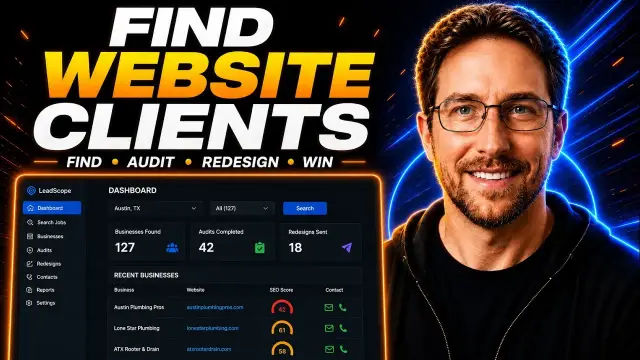
LeadScope lead generation tool: Places search, audits, CRM
Watch on YouTube ↗ Subscribe on YouTube ↗
A tour of LeadScope, a lead generation tool Mike built in about four hours with Codex and GPT 5.6. It searches businesses by category and place through the Google Places API, audits their websites with PageSpeed, writes pitch emails, keeps a CRM and sends through Gmail or Mailgun. Mailgun and the automations page are not working reliably, and redesign mockups are weak. Spending so far is $1.73 on Places.
Video summary
Lead generation tutorial for web agencies — Claude Code-built CRM flow from discovery to outreach.
The video covers 10 parts: Initial project overview and progress, Introducing Lead Scope and the landing page, Dashboard walkthrough and lead search, Reviewing specific lead data and ratings, Running automated website technical audits, Generating pitches and email automation, Switching between Mailgun and Gmail settings, Follow-up sequences and pipeline tracking, Insights tab and discovery funnel overview, and Visual redesign mockups and deep research features.
What this video covers
What you build
A web app with lead search, Playwright contact discovery, website audits, drafted emails, a built-in CRM, sequences and an insights page.
Tools used
Key steps
- 0:33 - See the landing page built in GPT 5.6 and the idea of audit-based outreach.
- 1:40 - Search for HVAC businesses in Phoenix with the Places API and find contact details with Playwright.
- 2:25 - Open a lead page with rating, phone and email, or view it in the CRM.
- 3:04 - Run automated site audits that flag missing HTTPS, meta descriptions, JSON-LD and image alt text.
- 3:45 - Generate pitch emails and send one through Gmail.
- 5:06 - Switch between Mailgun and Gmail settings, since Mailgun is not working fully.
- 6:22 - Set up follow-up sequences and pipeline tracking.
- 7:52 - Read the insights page and discovery funnel.
- 9:26 - Look at the unfinished redesign preview and deep research plans.
Not covered
- Results from outreach, such as replies or clients won.
- Automatic sending and open or reply tracking, which wait on Mailgun working.
- Rules on cold email and on collecting contact details from business websites in different countries.
- Pricing for the tool, which is still to be built.
In this video
- 0:00 Initial project overview and progress
- 0:33 Introducing Lead Scope and the landing page
- 1:40 Dashboard walkthrough and lead search
- 2:25 Reviewing specific lead data and ratings
- 3:04 Running automated website technical audits
- 3:45 Generating pitches and email automation
- 5:06 Switching between Mailgun and Gmail settings
- 6:22 Follow-up sequences and pipeline tracking
- 7:52 Insights tab and discovery funnel overview
- 9:26 Visual redesign mockups and deep research features
Questions and answers
How much has LeadScope cost to run?
Mike says $1.73 on the Places API and nothing for PageSpeed, which was called about 1,300 times.
What does the audit look for?
Things like missing HTTPS, meta descriptions, structured data, Open Graph tags and image alt text.
Is LeadScope available to use?
Not yet. Mike asks viewers to comment if they would use it, and the landing page and pricing are unfinished.
Keep learning
Transcript
So, you can see it only took a few seconds and I've already got 54 total businesses. Three of them currently don't have a website. So, those are marked as high opportunity people that I might want to reach out to. And you can see right here. But overall, this is really, really good. And it's only taken me about 4 hours to build this so far. So, yeah, definitely a work in progress, but it's coming together quite quickly.
Currently, I've only spent a $1.73 with the Places API and $0 with Page Speed, which I've called 1,300 times to do all of the site audits. I'm going to be taking you through this new lead generation tool that I've built, which also includes a CRM, email automations, as well as sequences. It's currently called Lead Scope until, or unless I can find a better name. I just whipped up this professional landing page in GPT 5.6. six in about 5 minutes using the redesign skill.
Read the rest of the transcript
And already I really like the way it looks right off the bat. It's also going to have deep research built in as well, so that it will automatically research each lead and then send them a tailored pitch based on what they need. So you can see here, make every outreach decision earn its place. It allows you to search.
You can choose your marketing category, get a focused run of businesses with public listing data and then you can run search audits or site audits I should say to read the website through a lens of search visibility, speed and conversion friction and then from there you can shape the offer like I was saying about deep research and then send with context. It's got email automations built in as well.
And in order to get started, you can just go ahead and open up Lead Scope and it will take you to the dashboard which currently looks like this. So if I come over to new search, you can see find the businesses business. It allows you to find the businesses that need a better web presence. So all I would need to do is enter in a business category and a market location. I could do, for example, HVAC, Sedona.
Let's see, Phoenix, if I can spell that right, Phoenix, Arizona. And then I can just click on find opportunities and it will use the places API to automatically get all of the details. And it's also going to go to each one of the websites and use playright to get all of the contact details. We've got United Air Cooling and Heating in Phoenix. And then this one, HVAC Purex Repair Phoenix.
And if I want to review this lead, I can just click right here and it will open up this beautiful page right here, which I've just recently redesigned. with the address as well as the Google rating, the phone number, all of the details over here. And we can also view this inside the CRM as well. So, if I click on view and CRM, we've got our own CRM built in over here.
And it shows you the contacts that haven't already been contacted as well as contacts that I've already sent emails to. They're all over here. We did find their email address and we've got the phone number and everything. And then it also runs site audits as well using Google page speed and I believe also Lighthouse. And you can see here what the website is currently missing. So this one is not served over HTTPS. It's missing meta descriptions.
There's no JSON LD which is really important for AI search visibility and that sort of stuff. It's missing open graph. Uh it's missing URL tags. And 24 out of 24 images are missing alt text. So, we've got all of the key findings over here, which we can then use to send to the prospect and then ask them to get on a call or, you know, whatever you want to do.
And then I've even gone so far as to create the initial email that is going to be sent to the prospect. From here, you can easily copy this and you can send it manually or you can use the email automation tab over here to send the emails to each one of the prospects. So, you can see over here I've got 285 leads that are ready to go. Keep in mind, not all of them have email addresses, but many of them do.
So, this is my email automations feature. Sometimes it doesn't work 100%. Um, not sure why I'm getting that error occasionally. Um, but I definitely have to fix that. I think it might be because it's still adding stuff. So, let's see. Now, in this case, if I want to fix the error on the automations page, I can come over to my logs in berscal, this is the best way to do it. And then all I have to do is say fix this bug.
And then we're just going to paste that in over here because I am having some issues actually accessing automations from time to time. Uh, let's try that again. It should load. No issue whatsoever, but it's still having some problems. So, not exactly sure what's going on there. I'm still working to improve some of that functionality over here inside Codex and I've also integrated mail gun into this as well.
So you can either use mail gun or gmail to send the emails and I just decided to use mail gun to for mass email and that sort of stuff. But now if I want to configure that I can come over here to settings and I can switch it to Gmail since mail gun's currently not working 100% yet. I'll switch back to Gmail and it should update over here. Sure enough, we've got now Gmail.
And if I wanted to go ahead and send an email to this company, let's say Parker and Suns in Phoenix, Arizona, all I have to do is click send via Gmail. And then I would just check my phone and see if it actually sent the email, which I'm sure it did. And boom, there we go. So, it sent the email over. Looks like that one was actually an invalid email. You can see here it's not like 100% correct.
So I would then send this one via Gmail and check my inbox again. Sure enough, it did go through with the complete email sent. And that's pretty much all there is to it. You can go through and send them all manually. And I would also like to automate this process as well. That's a feature that is not currently available yet. Uh but it's a work in progress. And then we can also come down to sequences.
And this basically going to do a lot of the followup automatically. And I do need to get Mail Gun working correctly in order for this to work properly. But you can see here that I can automatically schedule a follow-up to each one of these companies. And I've got all of the leads over here, which we can also see inside the CRM.
So rather than using something like go high level or any of the other competitors, I've just decided to build my own CRM directly into the platform over here. That way I don't need to pay for an additional service or anything like that. I can easily just use my own CRM and you can easily see how many you know what what's going on in the pipeline over here. So these are companies that I've already sent an email to.
We can also mark it as open, replied, follow up, bounce. Uh, that's going to be working once I've got Mail Gun integrated properly. So, it'll automatically track opens, replies, bounces, all that sort of stuff through the CRM. We've also got the contacts tab over here as well, where you can just go through and take a look at all of your contacts. Looks like I already have 3,300 contacts over here, and I can easily export all of those contacts as well.
So, if I want to just go ahead export all these people, I can go ahead and do so. And now we've got a CSV file with all of the leads in there directly. So, that's nice to have. And we've also got an insights tab as well. And this just gives you a big picture overview of, you know, how many leads you have, how many uh it also shows you the discovery funnel as well. So these are the businesses found.
These are the ones that have a website. These are the ones that have been audited. Contact discovered emailable. Uh so these are all the ones that currently have email addresses out of I guess 592 or so. And we've also got the most common site issues over here as well. So for example, eight of the 39 images missing alt text, 61% of the websites.
Um, so it looks like a lot of the websites definitely need work with their, you know, just making sure the website is all designed properly and everything like that. Also, this just gives you an overall ranking in terms of, you know, are these people worth reaching out to or not? And looks like the majority of them are. I think the lower the score, the better because it's basically ranking the site audits.
And yeah, so we've got 126 websites that are not served over HTTPS, which is a high it's a that's a very critical thing on the website that they would need to fix. And that's 126 businesses that have this issue, which I could then charge a premium for to fix basically. And keep in mind, this works anywhere in the world. It's not just the United States. You can run this anywhere in the world and it should work just fine. I could do the same thing in Thailand.
I could do it in Japan. I could do it in parts of Europe, wherever I want. But in this case, I'm mostly just targeting the US. And then we've also got previews over here as well. I'm not sure if this one is working 100% yet, but essentially what I want to do is use Vercel. Versil has a feature which allows you to it's basically like a AI agent that can run and it can run through the website.
It already it's already taking screenshots of each of the websites. So it could basically create a mockup of what the redesign would look like. And this is what it's currently looking like right now, which honestly is not that great. I want to improve this. But basically what I want to do is compare them side by side. So, it'll take the screenshot of the current website.
And then also, I want to generate a concept or like a mockup of what the redesign website would look like over here, which I could probably do inside Claude Code, but I think it's going to blow through a lot of credits. So, I haven't gone ahead and done that yet. I'm just using the Vercel AI agent for now until I can find a better solution. You will have the option to choose which one you want to use and also deep research.
So essentially what I want to do is do research on each one of the prospects and then craft a pitch tailored specifically to their needs. So that's another thing that I'm continuing to build out over here. And if any of you would be interested in using a service like this, just let me know in the comments below. Uh the landing page is still not 100% finished and I also need to build in the pricing, like the three tier system pricing.
So I'm going to be doing that over the next few hours. Uh, but yeah, definitely just let me know if you'd be interested in using a service like this. Obviously, there's a lot of other tools out there that you could be using, but I think I'm going to keep this one really low cost. With that being said, thank you so much for watching this video. Please go ahead subscribe to the channel if you haven't already. Take care, stay safe. Peace from Thailand.
We'll see you in the next one. Signing off.