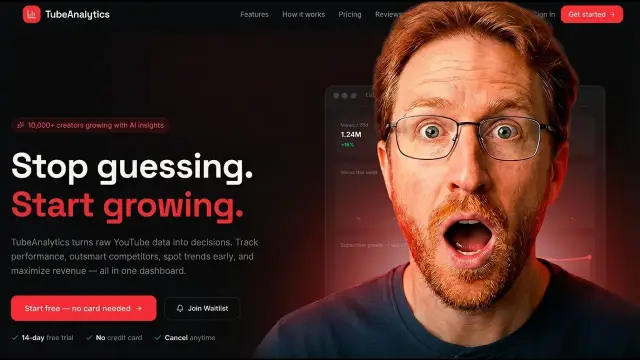
Why I built TubeAnalytics for YouTube creators
Watch on YouTube ↗ Subscribe on YouTube ↗
Written guide: TubeAnalytics Build Log: From First Demo to Daily Debugging
Why the TubeAnalytics SaaS was built, how Claude Code, Gemini and OpenCode were used, then a tour of its dashboard, competitor tracking and AI tools.
Video summary
The video covers 10 parts: -Intro to TubeAnalytics: A SaaS platform built in 2 weeks using AI tools like Claude Code and Gemini., Pricing and Plans: Overview of the Starter ($19/mo), Professional ($49/mo), and Enterprise ($149/mo) tiers., Dashboard Walkthrough: Real-time tracking of subscribers, views, watch hours, and revenue., Audience Intelligence: Health overviews, active subscriber rates, and actionable tips for channel growth., Video Performance & SEO: Detailed analysis of retention graphs and on-page optimization scores., Content Calendar & Planning: Managing ideas, scripts, and filming schedules directly within the app., Competitor Tracking: Stacking up your channel against others with gap analysis and engagement metrics., AI Tools Suite: Generating content ideas, scoring thumbnails, and performing keyword research., Monetization Scenarios: Predictive modeling to increase revenue through optimized upload frequencies and sponsorships., and Comment Manager & Reporting: Responding to viewers and generating PDF reports for demographics and revenue..
What this video covers
What you build
A tour of a finished YouTube analytics SaaS and how it was built. The walkthrough covers plans, the dashboard, audience and video scores, a content calendar, competitor tracking, AI tools, monetization scenarios and reporting.
Tools used
Key steps
- 0:00 - Hear how the platform was built in about two weeks with AI coding tools.
- 1:44 - Review the Starter, Professional and Enterprise plans.
- 3:16 - Walk through the dashboard of subscribers, views, watch hours and revenue.
- 5:32 - Check video performance and on-page SEO scores.
- 9:03 - Track competitors with gap analysis.
- 9:47 - Use the AI tools for ideas, thumbnail scoring and keywords.
- 11:05 - Model monetization scenarios.
- 14:28 - Manage comments and export PDF reports.
Not covered
- Independent verification of the build time or traffic claims.
- Current prices, which this walkthrough shows at the time it was made.
In this video
- 0:00 -Intro to TubeAnalytics: A SaaS platform built in 2 weeks using AI tools like Claude Code and Gemini.
- 1:44 Pricing and Plans: Overview of the Starter ($19/mo), Professional ($49/mo), and Enterprise ($149/mo) tiers.
- 3:16 Dashboard Walkthrough: Real-time tracking of subscribers, views, watch hours, and revenue.
- 4:18 Audience Intelligence: Health overviews, active subscriber rates, and actionable tips for channel growth.
- 5:32 Video Performance & SEO: Detailed analysis of retention graphs and on-page optimization scores.
- 7:47 Content Calendar & Planning: Managing ideas, scripts, and filming schedules directly within the app.
- 9:03 Competitor Tracking: Stacking up your channel against others with gap analysis and engagement metrics.
- 9:47 AI Tools Suite: Generating content ideas, scoring thumbnails, and performing keyword research.
- 11:05 Monetization Scenarios: Predictive modeling to increase revenue through optimized upload frequencies and sponsorships.
- 14:28 Comment Manager & Reporting: Responding to viewers and generating PDF reports for demographics and revenue.
Questions and answers
How long did the TubeAnalytics build take?
Roughly 150 hours over about two weeks, Mike says, and he estimates two years without AI coding tools. These are his own figures.
Which AI tools were used to build it?
Claude Code, Gemini and OpenCode.
What TubeAnalytics plans are shown?
Starter at $19 a month, Professional at $49 and Enterprise at $149, as listed in my walkthrough.
Keep learning
Transcript
Hey there, welcome to the channel. In this video, I want to take you through this powerful software as a service platform that I've been spending about 150 hours building using AI tools like Claude Code, Gemini 3.1, and also OpenCode. I would say it probably would have taken me about 2 years, most likely, to build this software as a service if I were building it myself because, even though I have a computer science degree, I haven't really been coding for a long time now.
And luckily, using the new AI Vibe coding tools that are available, I've been able to build this in about 2 weeks versus 2 years. And keep in mind, it's still undergoing development. It's a constant evolution process. Uh I can take you to show you the change log real quick. So, it's basically all the changes that I've made on a daily basis. Um you can see everything that I've changed, and this is all being done using Claude Code, and it's really, really powerful.
Read the rest of the transcript
I just recently did a full press release, so it went out to a bunch of media publications, which I can show you over here. It's gone out to, you know, a lot of media publications in the US. And the goal of this is essentially to just build the backlink profile. Uh currently, my domain rating is 39. So, it went from about 0 to 39 roughly a week. And I'm just building all of the backlinks, which we can see over here in Ahrefs.
And I'm not I'm not calling out Mr. Beast or anything, but it's it's better than ViewStats, and it by a long mile, uh which is Mr. Beast's uh YouTube analytics tool. So, I really want to see this do well. You're welcome to sign up. I'll show you the pricing a little bit later, but first, I just want to go through the feature set here.
So, we've got the analytics dashboard, video performance, audience insights, and you can click on all of these to read through each one of the features. Um they've got the starter plan, professional plan, and also enterprise. You can see there's a lot of features built into this platform. And I also do a lot of comparisons as well. So, I've got a full comparison page, which is also really, really important from an SEO perspective.
You're going to want to make sure that you have the comparison pages all filled out here. So, here's a comparison with Tube Analytics versus Viral Outlier. And it's specially formatted so that it shows up in the AI search results, and also SEO search results, Google, Bing, all the major search engines. I'm already signed in with Clerk, so I'm using a secure user authentication tool to build the entire thing for the user authentication. You can know that your data is safe.
And I've also run a full security analysis on the site as well. It's already super well optimized and very secure. Um so, you can also look at the pricing here as well. So, we got the starter plan for $19 a month, professional is 49 a month, enterprise is $149 a month, and then we also offer the annual plan, so you can save up to 20% if you sign up with annual plan.
You just click on get starter, get professional, get enterprise, and then you can create your account, and then you're going to sign in with your YouTube channel. So, once you sign in, you will be taken into your dashboard right here. And this is real where the true power of Tube Analytic comes into play. So, you can see right off the bat, total number of subscribers over the past 28 days, total views, watch hours, and also, most importantly, the revenue.
This is for the channel where you're watching this right now. I've made about 120 bucks in the past 28 days. And you can also zoom out. So, in the last 90 days, I've made almost $300. Uh it shows that it's monetized. You can see the average watch time, total number of views over that period of time. Uh gain subscribers.
It also shows the performance down here with a graph, so you can see exactly how many subscribers you're gaining and total number of views on a daily basis. You've also got the views and engagement down here as well. And I know what you're probably thinking, why can't I just use YouTube Studio to do a lot of this stuff?
And the fact of the matter is, yeah, you can use YouTube Studio to find a lot of this data, but this one goes above and beyond what's available inside YouTube Studio. So, you've also got your audience tab right here, audience intelligence, where you get a full breakdown of your health overview. So, active subscriber rate also shows the engagement rate, and then you can click and expand these as well to see ways that you can improve each one of these things.
And I think that's what's really the the key differentiating factor for Tube Analytics versus YouTube Studio is it actually shows you how to improve and grow your subscribers, grow your total number of views, optimize thumbnails. All of that stuff is built directly into this powerful software as a service platform, and it only starts at $19 per month. So, it's very affordable. We can also check a look at the segments as well.
So, it breaks it down by new subscribers, active subscribers, and casual viewers into this nice sort of pie graph right here with the percentages, and it just looks really nice. Uh you can also take a look at your super fans as well. So, here's the total number of super fans, apparently, that I have on the channel, and dormant subscribers as well, which is roughly 10% according to the data here.
And we've also got the video section, so you can click and drill down and see what each one of the videos, how it's performing, total number of views, uh engagement, retention as well. So, it has a retention graph, which you can also get access to inside YouTube Studio, but this is just a lot more powerful in terms of the total feature set that's available to you that goes above and beyond YouTube Studio.
For example, you can take a look at the SEO and optimization here, and it says the title's too short. So, it's only 33 characters, and it should be 40 to 70 character characters. So, that's something that you can easily improve, and it just gives you tips to actually fix up each one of your videos. If I come on over to one of my long-form videos here, this is a recent video tutorial I put up, we can take a look at the retention graph for this one.
It's about 269% higher than the channel average, which is definitely encouraging. You can play the video, take a look at the retention graph, and also traffic. So, this is showing where the traffic is coming from. It's mostly 41% subscribers. You can see the total number of external traffic, uh traffic coming from YouTube search, and then once again, you can also check the optimization. This one's already really, really well optimized. It's 97% out of 100, so it's doing really well.
But it does recommend adding some more tags to the video, and then also timestamps. So, this is really important right here is that it's actually um you know, helping you improve over time so that your channel does better and better. Uh next, we can go through the performance tab as well. So, it just shows how each one of the videos is doing, and then once again, it also shows improvement recommendations here.
So, in this case, I would like to it would like me to improve the the increase the number of likes. This one as well. Uh we can take a look at the videos that need work. So, this one needs more views. This one needs more likes and views. We've got another tab here, which is engagement, so you can take a look at the engagement on each one of the videos.
This one's not like super helpful or anything, but I just decided to build it in there anyway just so you can get a big picture overview of how each one of the videos is doing. We've also got a content calendar calendar built directly into Tube Analytics as well. So, you can save your content ideas right here, an idea, script, a film, and then you can basically just fill this out so that it helps you keep track of what you should be working on day by day.
And then also analytics. This one is really important because you can take a look at the audience. It has a full breakdown of the countries where people are watching, and then also the traffic sources as well. So, you can see exactly where your traffic is coming from, whether that's Google search, or maybe you're promoting your channel on Facebook or LinkedIn as I have been doing recently. You can get a full breakdown, and you can see where you want to start promoting a bit more.
It also tells me that my top external platform is through Google search, so more and more people are finding me through Google search. And obviously, you can also expand out to 90 days, and once again, it's also Google search. You can see your uh average view duration as well, total number of views. And you can also see the behavior as well.
So, you can check to see when is the best time to publish, which again, you can also do through YouTube Analytics, but this just provides a really nice interface, which is easy to use. Another thing you can do is add competitors. So, if I want to track a competitor like maybe I want to add Jono, I think his name's like Jono Catalif right here. I can also add him, and then we can see how many subscribers, total number of videos.
We can also check the analytics here as well. So, we can just pull him in, and as you can see, there's the engagement rate, average number of views, videos per month, all that stuff. You can also check the gap analysis. So, basically, how my channel is stacking up against some of these other AI automation channels, and things that I might want to do to fix that. And yeah, it's just a really, really powerful platform. Another thing you can do is check the trends.
So, let's say you want to track different trends, you can do that from here. You can also find AI content ideas. So, if I want to search for like Gemini, it will pull it pull that in and generate AI ideas based on other videos that have done well, and it will give you all all the suggestions. You can also score your thumbnails through here as well.
So, it's kind of like a full-on suite of all the different tools that you might want access to um built into one single easy-to-use platform. Uh so, if I want to let's say do another test on a thumbnail here, I just come over here and I can upload a thumbnail, and then I can analyze that thumbnail. It uses ChatGPT essentially to test the thumbnail and give it a score.
So, this one you can see uh the full breakdown, 60% and it shows different suggestions to make this a better thumbnail. So, also very powerful. You've also got AI search tools built into this as well. So, if I just type in AI automation, it will pull up all the keyword research. And then also, you can test SEO. Lots of different things built in here, including monetization. So, you can see how your channel's doing and then also optimize it as well.
It's basically anything that you want to optimize on the channel to increase your overall earnings, in other words, ad revenue on the channel, it will give you different scenarios and things that you might want to improve. So, for example, it tells me to increase uploads by 50%. Uh optimize titles and thumbnails for higher click-through rate and also focus on high CPM topics. And that should increase my average revenue by about 10% per month. And it breaks it down by conservative growth and aggressive as well.
So, for aggressive, it tells me to double the upload frequency, add memberships and super chat, which is interesting. I probably should be doing that, which I think I've already done as a matter of fact, and then also sponsorship deals. So, if I can get more sponsorships for my channel, which is already starting to happen slowly but surely, then I could increase my revenue by about 5% per month. And it even shows milestone estimates as well.
So, if I want to hit 10,000 subscribers, they're saying it's going to take until 20 2031 to do that, which is another 67 months. So, ultimately, I would need to focus on scaling up my content, that sort of thing, to hit that in a shorter period of time. And you can see here, here's my potential revenue increase. If I were to optimize the channel, it could go up by about $506 per month if I actually perform these different recommendations.
So, it gives you specific steps to hit your revenue goals with the channel. Obviously, one of the highest bars that you have to hit is uh getting monetized in the first place, which only about 7% of YouTubers are successfully monetized, which is a very, very small percentage out of, you know, hundreds of millions of channels, and luckily my channel was one of those that is successfully monetized.
So, now it's just a matter of scaling it up, and I ultimately built this tool for myself because I wanted access to a lot of these analytics that I wasn't getting through YouTube Studio, so I just decided to build it. And I'm already starting to promote it a lot. As I say, it's already got a pretty decent domain rating, and that's just going to continue climbing as I keep building backlinks to the site and getting featured in media publications, that sort of thing.
So, I highly recommend uh signing up for Tube Analytics. This isn't like a fully promotional video, but I did want to go through the tool because I've spent about 160 hours so far building this uh using the AI tools. It would have taken me, like I mentioned at the beginning of the video, probably about 2 years to build this if I were coding it myself, assuming I was able to even finish it in the first place.
So, highly recommend learning these skills, and that's what I teach a lot on my channel as well. You can also pull in transcripts as well, which this actually took me quite a while to figure this part out, but it does now have transcripts built directly into it with or without timestamps and then also in plain text as well. I'm using a special extension to do this.
Don't ask me how it works because AI built the whole thing for me, but it's able to get all of the transcripts here, which you can then feed into, let's say, an image generator and you can generate images from the transcript. And then I another feature that I've built in recently is the comment manager as well. So, this one's really cool. You don't have to go back and forth to your YouTube channel and respond to comments.
You can just do it directly from within Tube Analytics right here. So, as you can see, if I want to reply to any of these comments, I can do so from here and it will just pop open this reply to comment and I can type something in and it actually responds, and you can go over and check your YouTube channel and it is responding to the people on the channel using Tube Analytics. So, I don't even have to leave this platform.
I can pretty much do everything that I want to directly within Tube Analytics. And then, the last but not least, you can also generate reports from here as well. Everything from audience demographics, traffic sources, revenue summary, and then all you have to do is just click on generate report, and then you can just go ahead and download that as a PDF. This is the full report that was generated for the channel, total revenue, traffic sources. This is just a very basic report.
If you want access to better reports, then you would need to be on the professional or enterprise plan. You can also generate weekly digests as well if you want to and just create a schedule, and you can enter in your email here, and then it will just send you weekly digests, in other words, weekly reports. So, I can go ahead and create a weekly digest and it will just send me reports every single week.
I've also built in an AI chatbot over here as well, which is just using ChatGPT. Uh so, if you have any questions about anything, you can just go ahead ask the chatbot. So, it just responds, and in this case I'm asking what is CTR mean, and it's telling me what the click-through rate is all about. You can connect up to one channel on the starter plan, three channels on the pro plan, and up to five channels on the enterprise plan, which you can upgrade from in
from within here as well. So, if you want to sign up, I'll leave a link down below. Um especially if you're new to YouTube or if you've already got a monetized channel, this is just going to help you scale it up even faster. So, go ahead, explore the features. You can sign up quickly and easily on the website. And you can also see how it stacks up against other tools like VidIQ, uh TubeBuddy, and a bunch of other ones as well, directly from within Tube Analytics.
And last but not least, you can also sign up to join my affiliate program, which will earn you a 30% recurring commission for the entire life cycle of the customer. All you have to do is click on become an affiliate, and you can sign up through Cream, which is what I'm also using for payments. So, they've got their own affiliate dashboard, and you can sign up from there. Everything is already set up, ready to go.
And if you refer up to 10 customers, you could be making about $57 per month, and that's on the starter plan. If they sign up for professional or enterprise, then you could be making like $147 to $900 a month through the affiliate program, and I'm always looking for more people that want to help me promote Tube Analytics in addition to all of the press and PR media exposure that I'm getting.
Um so, yeah, go ahead, join the ground floor, go ahead and sign up with Google, and you can get started right away with Tube Analytics. Thanks so much for watching this video. Please subscribe to the channel if you haven't already, and I will see you in the next one. Take care, stay safe. Peace from Thailand. Signing off.